
On This Page
I've had Rize running on my work machine every weekday for a little over a year now. It has quietly tracked my coding, my writing for my website, every Slack rabbit hole and every meeting that should have been an email.
Most Rize reviews online are written after a week-long trial. A week tells you whether the app installs and the dashboard looks nice. It doesn't tell you whether you'll still open it in month eight, or whether the data changes anything. That's what this review is about.
My verdict after a year, in short
Rize is the only time tracker I've kept. Not because it's the best at logging hours, but because it never asks me to do anything. It's genuinely useful for spotting how badly context switching eats a workday. It's also pricier than the free alternatives, blind to anything you do on your phone, and its AI categories need babysitting for the first few weeks.
Rating: 4.3 / 5
Why I started using Rize
My work is split between a software job and writing debugging guides for this site. Both need long stretches of attention. Both get chopped up by Slack, code reviews and "quick" checks of GitHub.
I'd tried tracking my time before and failed every time. Manual timers lasted about a week. I'd forget to start them, forget to stop them, and end up with a timesheet full of 6-hour "tasks" that were really lunch.
What sold me on Rize was one idea: it tracks in the background and I never touch it. That was the only kind of tracker I'd realistically stick with.
The first month was rough
I almost quit in week two, and I think a lot of people do.
Rize sorts your activity into categories automatically, and out of the box it guessed wrong a lot for a developer. Reading documentation in the browser counted as browsing. A YouTube conference talk I was watching for an article counted as entertainment. Long terminal sessions sometimes got split oddly.
The fix is boring but it works. You go into settings, re-label the apps and websites it got wrong, and add your own categories. I spent maybe two short evenings on it. After that the numbers lined up with how my days actually felt, and I stopped second-guessing them.
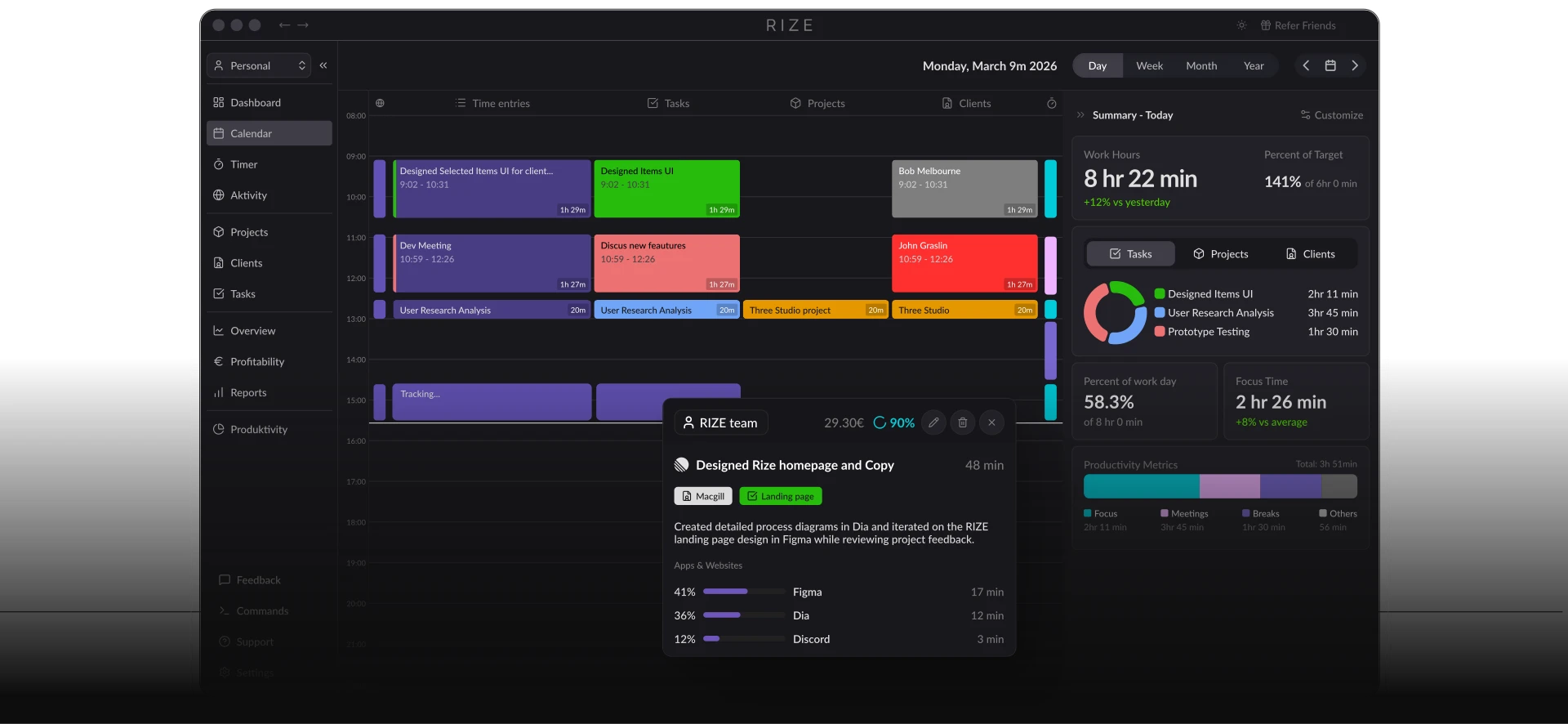
If you take one thing from this section: judge Rize after week three, not day three.
The features I still use after a year (and the ones I don't)
A year in, my use of Rize has settled into a few habits. Some features turned out to matter much more than the marketing suggests, and some I switched off.
Still use daily: automatic tracking
This is the whole reason the app has survived on my machine. I haven't pressed a start button in twelve months. VS Code, the terminal, Chrome, Slack and Zoom all get logged without me thinking about it. On a busy day that's the difference between having data and not having it.
Still use weekly: the weekly report
The daily view is interesting for about a month. After that, the weekly report is where I actually look. Every Friday I spend five minutes on it and ask one question: where did the deep work go this week?
Changed how I work: context-switching data
This was the uncomfortable one. Rize shows how often you jump between apps and how long your uninterrupted blocks really are. Mine were shorter than I'd have guessed. Seeing it in numbers, week after week, did more than any productivity article I've read.
Use sometimes: focus sessions
Rize detects focus sessions on its own, and you can also start one deliberately. I start them for the work that matters most, like writing a long guide or a hard debugging session.
Turned down: break reminders
Rize nudges you to take a break based on how long you've actually been working, not a fixed timer. Good idea, but in the middle of a debugging session it felt like an interruption. I lowered how often they appear.
Barely used: goals
I set a few goals early on, like a minimum amount of focus time per day. Honestly, I stopped checking them after a couple of months. The weekly report did the same job for me.
What I changed because of it
Tracking doesn't make you productive by itself. It's what you do with the numbers. These are the changes that stuck:
- Mornings kept free of meetings for writing and hard problems
- Notifications off while a focus session is running
- Code reviews batched into one slot instead of scattered through the day
Pros and cons after 12 months
What's good | What's not |
|---|---|
Zero effort. A year of data without pressing a single button. | No mobile app. Anything on my phone simply doesn't exist to Rize. |
The context-switching numbers changed real habits. | The first two or three weeks of categories need manual fixing. |
The weekly report is quick to read and genuinely useful. | No free plan. After the 7-day trial, you pay. |
Clean, calm interface that doesn't nag. | Costs more than tools with a decent free tier. |
Works quietly in the background without slowing my machine. | Break reminders can interrupt deep work until you tune them. |
Rize pricing, and is it worth it after a year?
There's no free-forever plan, just a 7-day trial. As of October 2026 (check current prices):
Plan | Price billed annually | Good for |
|---|---|---|
Standard | $9.99/mo ($14.99/mo if paid monthly) | One person: tracking, focus data, break reminders |
Pro | $14.99/mo | Freelancers: client reports, AI insights, API and Zapier |
Business | $23.99/mo | Agencies and consultants |
Team | from $16/seat/mo, 2-seat minimum | Small teams |
I'm on the Basic Plan, which comes to roughly [$120] a year before the discount. Is that worth it? For me, yes, but only because I used the data to change how I work. If you install it and never look at the weekly report, a free tracker will do just as well.
My rule of thumb: if Rize helps you protect even one extra hour of focused work a month, it has paid for itself.
Who should use Rize, and who shouldn't
After a year, I'd recommend it to you if you:
- Work mostly at a Mac or Windows desk: developers, writers, designers, analysts
- Have given up on manual timers before
- Suspect meetings and chat are eating your deep work and want proof
- Will actually look at a weekly report and act on it
I'd tell you to skip it if you:
- Do a lot of your work on a phone or tablet
- Only need basic timesheets, where a free tool is enough
- Aren't comfortable with an app knowing which windows you have open
- Want a free plan you can stay on long-term
Rize discount code: get 25% off
If you've read this far and want to try it, start with the free 7-day trial. If you decide to keep it, use my code when you upgrade so you don't pay full price.
Get 25% off Rize
Discount: 25% off
Rize promo code:CODELZ
Last checked: 31 October 2026
How to apply it:
- Open Rize through my link. You should see a banner mentioning the discount.
- Create your account and install the desktop app. The trial needs no card.
- When you upgrade, enter
CODELZat checkout and check the price drops before you pay.
On Standard billed annually, 25% off brings $9.99 a month down to about $7.50 for the discounted period. Choosing annual billing and then adding the code gets you the lowest price.
If the code stops working, tell me in the comments. I check it every month and update this post.
Rize FAQ
1) Is Rize worth it long-term?
For me, yes, after more than a year. It's only worth it if you look at the weekly report and act on it. Otherwise a free tracker does the same job.
2) Does Rize have a free trial or free plan?
There's a 7-day free trial with no card needed. There's no free-forever plan.
3) Does Rize work on iPhone or Android?
No. It's a desktop app for Mac and Windows. Phone time isn't tracked, which was my biggest gap over the year.
4) Is Rize good for developers?
Yes, once you fix the categories. It tracks VS Code, the terminal and the browser automatically, and the context-switching data is the most useful part for anyone who codes.
Final verdict
A year ago I wanted a tracker I wouldn't abandon. Rize is the first one I didn't. It didn't make me productive by itself. It showed me, week after week, where my focus was going, and that made the changes obvious.
It's not perfect. No phone tracking, a fiddly first few weeks, and a price that free tools undercut. But for someone who works at a desk and wants the truth about their day without any effort, it's the one I'd recommend.
Try the free trial first. If it earns its place, use code above.
Start your free Rize trial
Disclosure: this post has affiliate links. If you sign up through them I earn a small commission and you get 25% off. I paid for Rize myself for over a year before writing this, and the complaints below are real.
More reviews on CODELZ: Evernote Review 2026 ·

CODELZ Newsletter
Join the newsletter to receive the latest updates in your inbox.
